
Team and availability
Invite and manage team access
Send staff invitations, change access levels, and remove access safely.
For: Owners and administrators
Invite a team member
- Open Business setup → Team access.
- Enter the person’s email address.
- Choose the provider access label shown for your category, Office Admin, or Administrator when your own access allows it.
- Send the invitation. It expires after 48 hours.
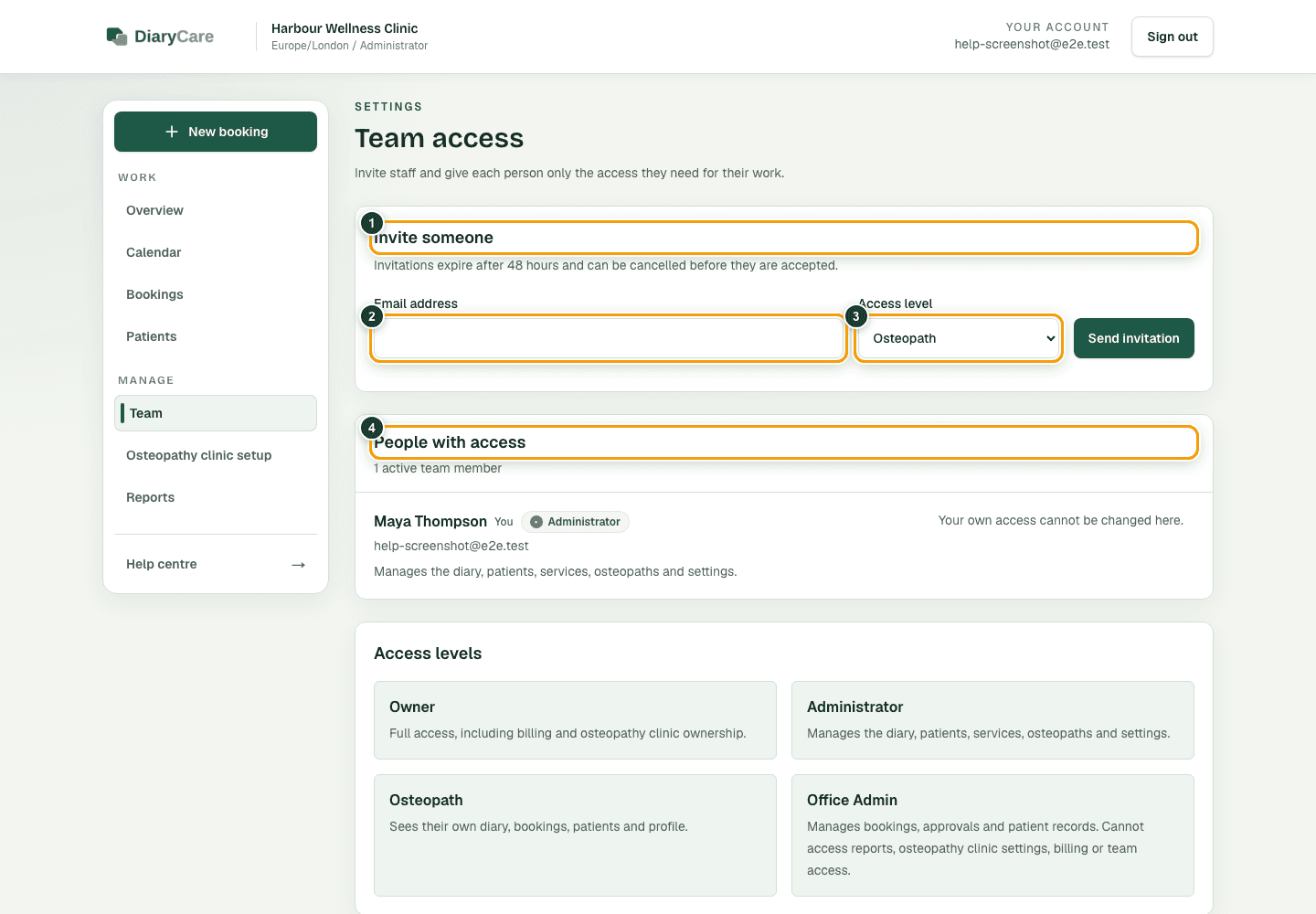
What the numbers show
- 1Start a new invitation here.
- 2Use the exact email the person will use to sign in.
- 3Choose the lowest access level that covers their work.
- 4Review current access before adding or removing anyone.
Manage existing access
- Change a person’s role when their work changes.
- Cancel a pending invitation before it is accepted.
- Remove a person’s access when they leave the business.
- Link a provider account to the correct provider profile.
Good to know: You cannot change your own access on this page. Owner access is protected.
Couldn’t find the answer?
Email contact@diarycare.co.uk and tell us which step you reached.
Contact support