
Online booking
What clients and patients see when booking
Follow the booking journey from choosing a service to receiving a result.
For: Business teams, clients, and patients
The booking steps
- Choose a service. Related variants can appear as labelled choices under one service family; each choice shows its own description, duration, and price when configured.
- The only location is selected automatically. Choose a location when the business has more than one site.
- If only one provider offers the service, DiaryCare selects them and goes straight to available times. Otherwise choose an osteopath, physiotherapist, stylist, or barber—or ask for anyone available.
- Choose a preferred part of the day when the business offers that choice, then choose an available time.
- Enter your first name and last name, contact details, a reason or booking note, and answers to any business questions.
- Check the appointment summary and submit the booking.
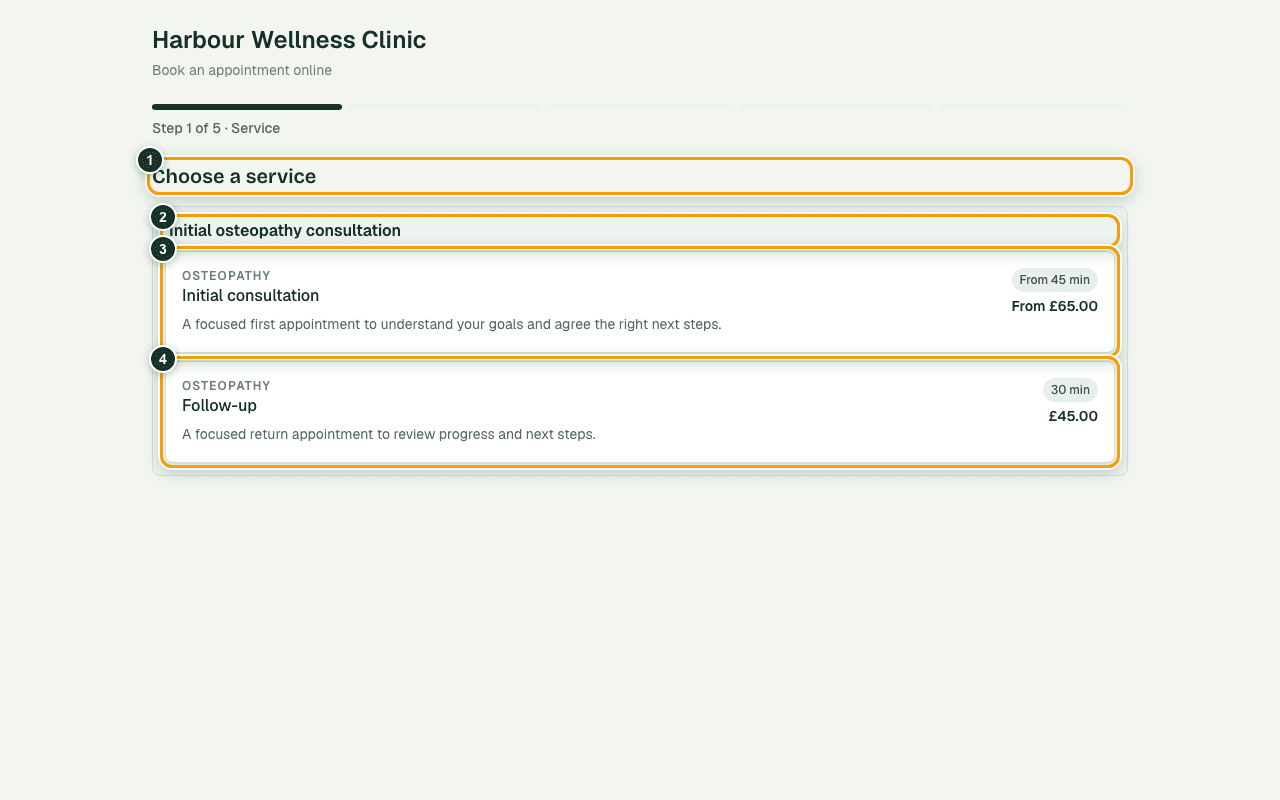
What the numbers show
- 1The heading tells the patient which choice to make.
- 2The family heading keeps related services together.
- 3Select the initial appointment option when it fits.
- 4Select the shorter follow-up option for a return visit.
Keep booking notes safe
- Osteopathy and physiotherapy bookings show Reason for visit and ask the person not to enter diagnoses, symptoms, medication, or other medical details.
- Salon and barbershop bookings show Booking note and ask the person not to enter sensitive personal information.
Eligibility and confirmation
A service may be for any patient, new patients only, or existing patients only. Existing-patient appointments are not hard-blocked when clinic records do not recognise the typed details (public booking fails open), because returning patients are often missing or mistyped in imported contact data. DiaryCare reconnects the booking to an existing client record only when the email and the full name both match, or when the name and phone both match. Two people who share a household email or phone keep separate records when their names differ. New-patient appointments reject a matching email and full name, or a matching name and phone number. New and existing patients are never emailed an authorisation or verification code while booking. The final screen says whether the appointment is confirmed or waiting for staff approval.
Couldn’t find the answer?
Email contact@diarycare.co.uk and tell us which step you reached.
Contact support