
Online booking
Add the booking widget to your website
Brand the widget, allow your website domain, and copy the installation code.
For: Owners, administrators, and website editors
Before you start
- Access to edit the clinic website and its HTML or website builder.
Set up the widget
- Open Clinic setup → Embed widget.
- Add the website addresses that are allowed to show your widget.
- Choose the brand colour and logo.
- Use Pull branding if you want DiaryCare to suggest colours and a logo from your website.
- Save the settings and check the live preview.
- Copy both lines of the embed snippet and paste them into your website where booking should appear.
- To hide the built-in Online booking heading, add data-hide-header="1" inside the copied script tag. This is a script option, not a saved widget setting.
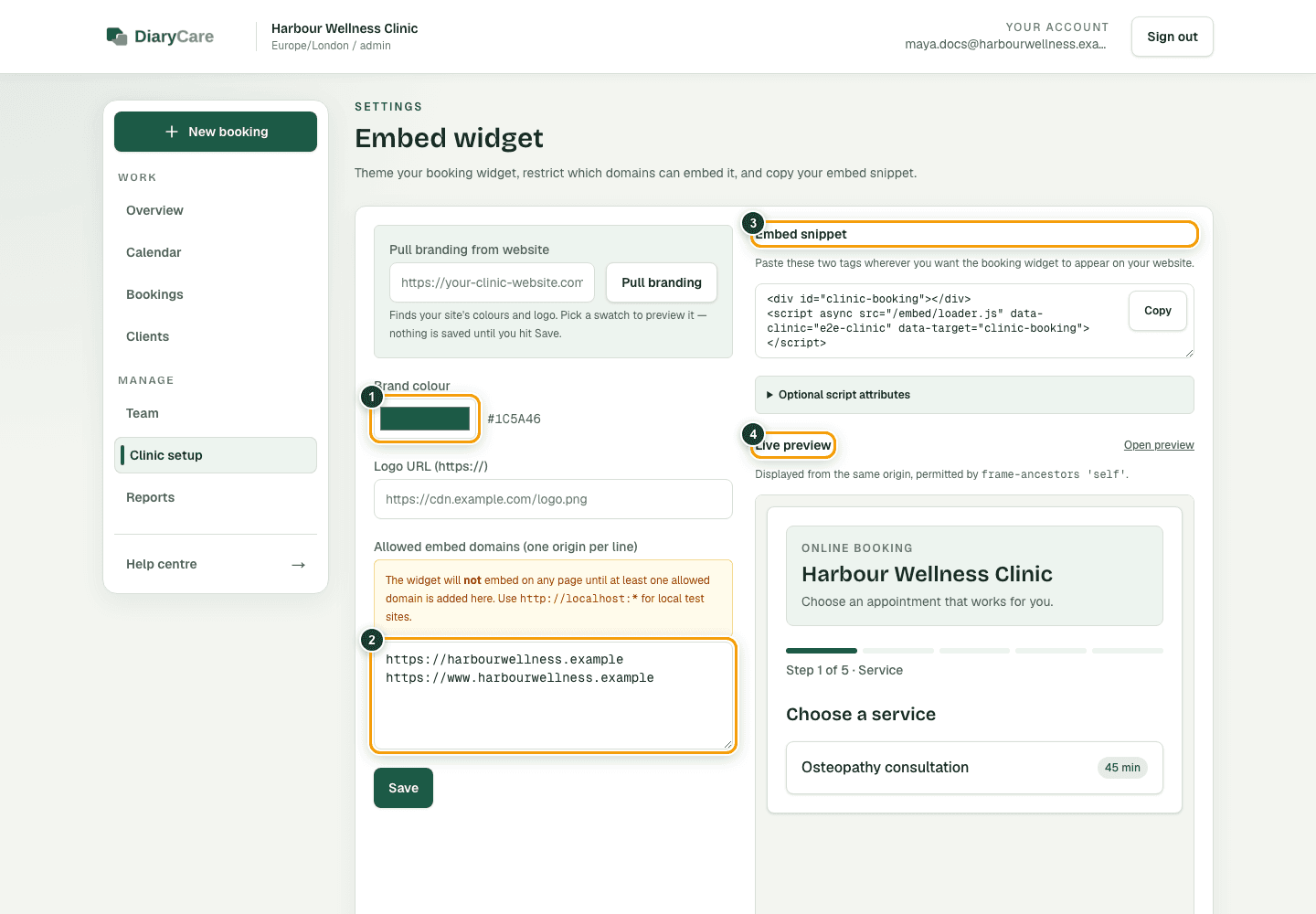
What the numbers show
- 1Choose a colour that remains readable with your website design.
- 2Add every exact website address that is allowed to show the widget.
- 3Copy both lines of the embed snippet.
- 4Use the live preview to check the patient view before publishing.
Good to know: Add the exact live domain, including any www version you use. The widget will not load on a website that is not on the allowed list.
Optional booking measurement
- Your website developer can connect the shared DiaryCare measurement script to your own Google Ads booking conversion and website cookie choice. This is an optional code installation, not a dashboard setting.
- Google measurement must remain off until the visitor allows it. Rejecting measurement must not stop them booking. Cookie settings on your website must let them withdraw permission.
- Only successful embedded booking submissions are measured. A booking may still need approval; this does not measure attendance or payment. Direct DiaryCare booking links are not covered by this website integration.
- Do not send contact details, symptoms, treatment choices or booking references to Google. Your developer must remove any older booking conversion listener to avoid duplicate counts.
Test the finished page
- Try it on both a phone and a computer.
- Make a test booking and check the success screen.
- Check that the surrounding website does not hide or crop the widget.
Couldn’t find the answer?
Email contact@diarycare.co.uk and tell us which step you reached.
Contact support